Chapter 6
The second project: when the error is invisible
A wrong name is visible, a wrong number is not. How to check a result you cannot look at, and how to stretch the net that lets you always go back.
The total that looks right
Let us pick up the folder from the previous chapter, the receipts one, now that it is in order.
And let us ask the thing it feels natural to ask next: not moving the files any more, but reading inside them. I want a table with the year’s expenses, one row per document: the date, who I paid, how much.
It comes back in a minute. The table is there, it opens in the spreadsheet, the columns are in their places, the dates are in order. At the bottom, the total: 4,812 euros.
And now the question, which is the whole chapter: is it right?
In the previous chapter this question had an answer in thirty seconds. You opened the folder and looked. The names read properly or they did not, the subfolders were there or they were not, the files were a hundred and forty or they were a hundred and thirty-eight. The error, when there was one, was visible.
A number is not. A wrong number looks exactly like a right one. 4,812 euros is a plausible figure: so would 3,578 be, so would 6,140. There is nothing in the table telling you which of the three you are looking at.
It is the same job as yesterday with a new trap in it, and that is exactly why it is the second project and not the first. The six moves from the previous chapter all hold, without changing a comma. But one of those six, the fifth, the checking one, no longer works the way it worked, and has to be rebuilt.
What you take home from this chapter
- what changes when the job does not move things but interprets them;
- the most important instruction you will ever write, and it is three words;
- how to check a result you cannot look at;
- how to stretch the safety net that makes everything else delegable.
You need the folder from the previous chapter, with its instructions.txt in
it. If your job was a different one, that is fine: all that is needed is that
there is now something to read inside the files, and not only to move.
The leap: from moving to interpreting
It is worth looking closely at what has changed, because there are three things and they hold for a whole category of jobs.
First: in the previous chapter your documents were never really opened. They were looked at from outside, moved, renamed. Now someone goes inside, reads a line written by an office you do not know, and decides that this is the document’s date and that is the amount. It is no longer transport: it is interpretation. And where there is interpretation there is chapter 3’s gap, the one that if you do not fill it, it fills.
Then: the result no longer resembles the raw material. Before you had a hundred and forty files and at the end a hundred and forty files, and you could count them. Now you have a hundred and forty documents on one side and a table on the other, which is a different kind of thing from what you started with. There is nothing left to compare by eye.
And finally: the error makes no noise. A badly renamed file jumps out at you as soon as you open the folder. A misread amount sits there quietly in the middle of another hundred and thirty-nine rows that are correct, and stays there until you go looking for it on purpose.
Do you remember the criterion from chapter 4, the one that weighed most? The good jobs to put in an AI’s hands are the ones where reality says whether it went well. A job like this one sits exactly on the boundary: reality would have plenty to say, because those numbers are written in black and white inside the documents, only it does not tell you by itself. You have to build yourself a way of asking it.
That is the whole chapter. We are not going to learn to trust more: we are going to learn to build a result that can be checked even when it cannot be looked at.
Preparing the ground, again
The folder is already there, so is the copy of the originals, so is the sheet of instructions. We do not start over: we add a piece.
The section describing the data
In the previous chapter the sheet explained how to name the files. Now it has to explain what the things written inside are, and they are all pieces of information that have been obvious to you for twenty years. Obvious things, as you now know, are precisely the ones that do not arrive at the other end.
How the amounts are read
The amounts are in euros, written the Italian way: the dot separates the
thousands and the comma the decimals. 1.234,56 means one thousand two hundred
and thirty-four euros and fifty-six cents.
I want the document total, what I actually paid: not the taxable amount, not
the VAT alone.

What I want in the table
One row per document, with these columns in this order:
date, supplier, category, amount, source file, to check.

If something cannot be made out
Do not invent and do not infer. Leave the cell empty, write "yes" in the "to
check" column and move on.
Look at the last block, because it is the piece of the whole book worth taking away even if you forget the rest.
Three words: I don’t know
A language model, as we said in chapter 3, produces the most plausible continuation. It has no place to light a warning lamp when it does not know: where information is missing, it puts something believable. On an illegible date, it puts a reasonable date. On an amount half covered by a stamp, it puts a number that fits.
It is not bad faith and there is no point getting annoyed: it is how it works. What you can do is give it somewhere to put the I don’t know. A column, a section at the bottom, a line in a list: anything, as long as it exists.
It is the difference between a table with a hundred and forty rows you know nothing about and a table with a hundred and thirty-one good rows and nine to look at. The second is worth infinitely more, and not because it is more accurate: because it tells you where to look.
The value is not in the percentage of correct rows. It is in knowing which are the wrong ones.
The column that looks pointless
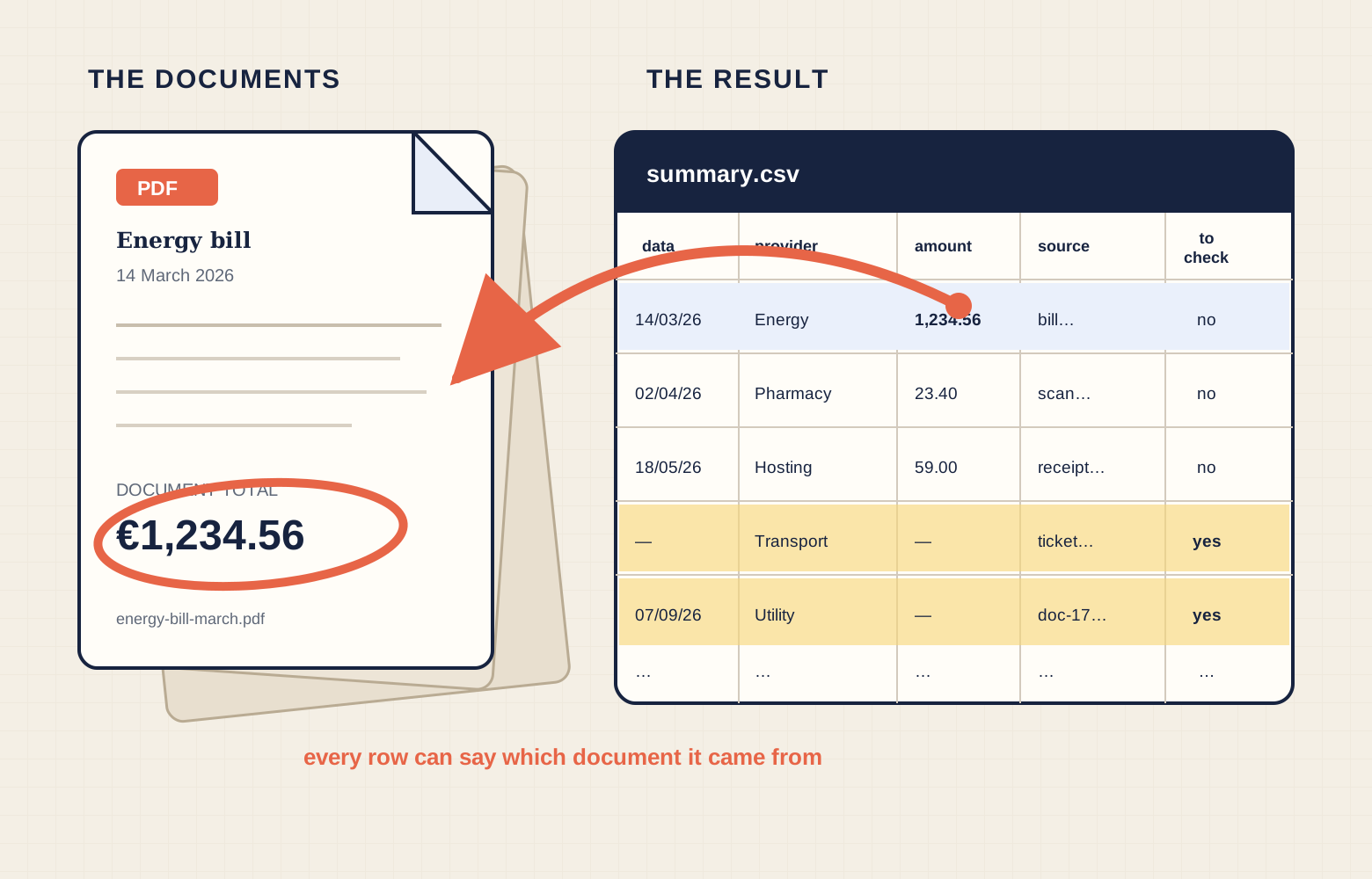
In the list of columns there is one that at first sight is cumbersome: source file. Every row of the table has to say which document it was pulled from.
It looks redundant, and instead it is what makes the rest of the chapter possible. Without it, when you find an odd number you have only an odd number and a hundred and forty PDFs to reopen. With it, you have an odd number and the document that contradicts it, one click away.
This has a name in the trade of people who work with data, and it is worth knowing: it is called traceability. In plain terms: every result must be able to say where it comes from.
Asking, and saying how it gets checked
The brief is the one from the previous chapter, with the same five pieces: what I want, where the things are, how it should come out, how I will check, what must not happen. I will not explain them again.
The fourth changes, the checking one, and it changes considerably. In the previous chapter it was a sentence (“I open the folder and I see the files with the date in front”). Here the check becomes something you ask for inside the brief:
Along with the table I want four numbers at the bottom: how many documents you read, how many rows you wrote, how many rows have the “to check” column filled in. And the sum of the amounts.
Four numbers that cost it nothing and are worth an afternoon to you. Because you make the first comparison right there, before even opening the spreadsheet: if it read a hundred and forty documents and wrote a hundred and twenty-six rows, something happened to the other fourteen, and you want to know what before looking at the total.
Mine, in full, so you can see what one looks like when it is finished:
In the folder
/Users/gianclaudio/Work/receiptsthere are the receipts, already sorted, and there isinstructions.txt: read it before starting, the rules for the amounts and the columns are there. I want asummary.csvfile in the same folder, with one row per document and the columns given in the instructions. Do not modify and do not move the PDFs: they are read only. When you cannot read a piece of data, leave it empty and mark “yes” in the “to check” column. Do not infer it from anything else. At the end of your answer write me: documents read, rows written, rows to check, sum of the amounts. Before starting, tell me what you have understood and the three things you are taking for granted.
A note on the format, which is the only technical word in this chapter. I asked
for a .csv file: it is a text file where the values in a row are separated by
a comma or a semicolon, and the spreadsheet opens it as a table. I prefer it to
an Excel file for a reason you will recognise by now: you can open it and read
it with your own eyes, even without the right program. It is transparent
material, and transparent things are easier to check.
Checking what you cannot see
The table has arrived. Now the checks, and there are four. You have already done the first by reading the counts. Three remain, and together they cost five minutes.
The extremes. Sort the table by amount and look at the two ends: the largest row and the smallest row. It is by far the most productive check, because reading errors almost never produce middling numbers: they produce monsters. A utility bill for 12,400 euros, a subscription for 1 euro 23. If the two ends are plausible, the bulk of the table almost always is.
The order of magnitude. Look at the total and ask yourself whether it resembles what you know about your life. You do not need to know it precisely, otherwise you would not be making this table: you need to know that you do not spend eighty thousand euros a year on utility bills. It is a check that looks crude and instead intercepts the catastrophes, which are the only ones that really matter.
Three rows with the document open beside you. Take three rows at random, look at the source file column, open those three documents and compare the numbers one by one. This is what the cumbersome-looking column was for: without it, this check takes half an hour and so you do not do it.
And then the pending rows, which are not a check but a job: the nine rows with “to check” filled in you sort out yourself, by hand, in ten minutes. They are part of the result, they are not a failure.
When it goes wrong
And now the honest part, as in the previous chapter: my first attempt was wrong.
The counts were right, a hundred and forty and a hundred and forty, nine rows to check, and the table had an excellent air about it. The total, though, was low, and I only noticed thanks to the second check, the order of magnitude: that number did not resemble my year.
I found it at the extremes. The smallest row was an invoice for 1 euro 23, and the real invoice, once opened, said 1.234,56 euros.
Look at what happened, because it is beautiful and it will happen to you too.
The thousands separator, which in Italy is a dot, is in half the world the
decimal comma. It read 1.234,56 as “one point twenty-three”, in the most
reasonable way possible, and it did so only with the documents of two suppliers
out of twenty: the ones that wrote figures in that format. The other hundred and
thirty-eight rows were perfect.
It did not disobey: in the sheet of instructions, the first time round, the line
about the amount format was not there. It is chapter 3’s type 2 error again, the
gap filled plausibly, and in jobs on data it is so frequent that it earns a
rule: if a format is ambiguous, declare it up front. Dates are the same
story, and worse: 03/04/2026 is two different days depending on who wrote it.
The correction, as you know by now, is not made by raising your voice in the conversation. It is made by adding the line to the sheet of instructions, where it stays even next March. It is the one you have already read a few pages back: I put it there because that is how it came about.
The safety net
At this point something is needed that changes the way you will work from now on.
There is a precise moment when you stop enjoying yourself: when the thing starts working. From then on every change is a risk, you touch a line and you are afraid of breaking what works, and the fear of breaking is why people leave things half finished. It holds for a working folder as for anything else: your table is good now, and next time you put your hands in it you have something to lose.
The solution is forty years old and so useful that programmers do not write a line without it. It is called version control, and the tool everybody uses is called git.
Said without jargon: it is a camera for folders. Every time things are in good shape, you take a photo. The folder goes on being an ordinary folder, but somewhere in there is the row of all the photos you have taken, with the date and a line of description.
One clarification that saves you a nasty surprise: the photographs are taken of the written things, that is, the sheet of instructions, the table and the requests you saved. Not the original PDFs: they are heavy, they do not change, and the camera has nothing to tell you about them. When you set it up, ask explicitly to leave all the PDFs out.
From which three powers you have never had:
- you go back. Made a mess? You restore the last photo where everything was fine. Not “undo” four times and hope: the folder exactly as it was on Tuesday at six;
- you see what changed. Line by line, between yesterday and today. When something stops working, the first useful question is always “what did I touch?”, and here it is written down;
- you take it elsewhere. The same folder, with its whole history, on another computer or on an online service.
The second power, in a job like today’s, is more precious than it seems: it lets you compare the table now with the table before and see which rows changed after a correction. Which is the only serious way of knowing whether a change fixed three cases or broke thirty.
The four things to know how to ask for
You do not have to learn git now. You have to know which four things to ask the AI for, so that if something goes wrong you also know where you want to go back to:
- prepare the folder and take the first photograph (
git init, thengit addandgit commit); - take a new photograph when the work is in good shape (
git addandgit commitagain); - show me the row of photographs (
git log --oneline); - take this file back to the last photograph (
git restore file-name).
The first time, also have it make a rule excluding the PDFs, and before every photograph have it show you what is about to go into it. You do not need to know anything else to do the exercise below without ending up with a broken folder.
Reversibility changes the dial
Now put this together with chapter 4, because it makes concrete the criterion we left there.
Do you remember the four questions for deciding how much rope to give? The first was: if it goes wrong, can it be undone?
A folder with its photographs answers yes. Always. For any change.
This is why programmers let AI work on their material with a calm that will strike you as reckless: it is not trust, it is that every single thing that machine touches can be undone in three seconds. The safety net is stretched first, and so the flight can be made.
The harness before the ride. It is not git that is interesting. It is that reversible work can be delegated and irreversible work cannot. Everything else follows.
On this kind of job you can turn the dial up in earnest: you can redo it letting it go on its own, knowing the worst thing that can happen costs one command and thirty seconds.
When there is nothing to count
One last step, and then we close. I put it here because it is the one you will spend more time on than you imagine, and because it is the only one in the whole book where I cannot give you a check to perform.
There are jobs where there is nothing to count. You ask for an opinion on a letter you have written, you get something explained that you have never studied, you try to work out why a decision you are making does not convince you. What comes back is not rows and amounts: what comes back is a judgement. And chapter 4 had already said it in one line, setting it aside: where there is no test, the checking stays entirely on your shoulders.
Now we pick it up, because that is where you will end up, and it is better to arrive knowing what to look at.
The subjects are not separate
The first thing you will notice is that this machine goes from a spreadsheet to a discussion about something you have written without noticing that it has changed trade. That is not brilliance, and it is better not to take it for brilliance: it is that for it they were not two trades. File names, utility bill amounts and a page you care about are the same material, namely language and procedures, and the separations between subjects live in professional bodies, in syllabuses and in the deference that makes you say you do not know about that sort of thing. They do not live in the things themselves.
From which the good part, which is bigger than it seems: it never asks you for credentials. It does not ask who you are to talk about a subject you have not studied. For many people, and perhaps for you too, that question was the real barrier, far more than the difficulty.
And from which the part to keep an eye on, which is the same thing seen from behind. A discipline is not only a fence: it is also a warehouse of objections accumulated over a century. A person who does that job, faced with a convenient juxtaposition, tells you no, and that no is the part that makes you grow. Here the no does not come as standard. The fusion always succeeds, and that is why it should be treated with suspicion: the typical result is something plausible in both fields and good in neither.
A wrong judgement has the air of a right one
Let me tell you how I noticed it myself, because it is the same story as the misread amounts, one floor up.
I had it read something of mine, one of the ones I care about. Back came a confident reading, well written, with a precise observation in it: a passage which in its view did not work. Except that the passage was deliberate, and part of a design you can only see by looking at other things I have written over twenty years and which it did not have in front of it.
It had not lied. It had one piece on the table, it met a gap and filled it in the most plausible way: it is chapter 3’s type 2 error, the usual one. The difference is what it produces. On receipts it produces a row to correct. Here, if I had taken that reading at face value, it would have produced a wrong idea about something of mine, and I would have carried it around with me.
Hence the rule for this category of jobs, and it is blunt:
In work that comes back as a judgement, the check is you. There is no folder to open: there is what you know about your own material.
Which has a flip side worth facing. On a subject where you are competent, this thing is an extraordinary interlocutor, because you can weigh its objections. On a subject where you know nothing, the conversation looks exactly the same: same fluency, same confidence, same air of making sense. Only you have no way of noticing. It is not a reason not to use it, it is a reason always to know which of the two situations you are in.
Why it is not a friend
It is often said that it should not be treated like a friend, and that is true, but the reason is usually given badly. It is not that it is fake. It is that it risks nothing.
When a person tells you that something you made is weak, they put something of their own into it: the embarrassment, the relationship, the fact that they will have to see you again tomorrow. It is that risk that makes their judgement informative. Here there is none: it does not get bored, it has no taste it has defended over the years, it owes you nothing and tomorrow it does not remember you. It can contradict you, and it does, but that is a behaviour, not a guarantee.
Which still makes it extremely useful, as long as you know what for: it is a whetstone, not a judge. You run the blade over it and feel whether it cuts. How good the blade is you decide, or someone decides who risks something by telling you.
One small thing, to finish
A tiny example, and a true one.
For some time I have kept the poems I write inside a folder under version control. The one from this chapter, the camera: nothing more. It is not a programmer’s thing applied to poetry as an affectation. It serves a practical fact that anyone who writes knows well, namely that at a certain point a text starts to work and from then on you do not touch it, because ruining it costs too much.
With the folder’s photographs, ruining it costs nothing. You rewrite the line that does not convince you, you look at how it sits, and if it was better before you go back to before. I have learned nothing new about poetry. I have stopped being afraid of a worse version, which is a different thing, and it was all that was needed.
It is also why the order followed so far was that one: first understand where the things are, then how they are named, then who does them, then how you check they were done properly, and finally how you go back.
It is the same gesture as the receipts, on the same computer, with something in it that bears no resemblance to a receipt. The subjects, as we said, were not separate.
The pocket notebook
- interpreting: reading inside a document and extracting a piece of data, which is a different job from moving it
- traceability: the rule by which every row of a result says which document it comes from
- “to check”: the place where the AI puts what it did not understand, instead of inventing it
- CSV: a text file the spreadsheet opens as a table, and which you can also read by eye
- control numbers: how many I read, how many I wrote, how many are pending, what the sum comes to
- the extremes: the check that looks at the largest and smallest rows, where errors hide
- version control (git): the folder’s camera
Where we go now
Two projects, and it is worth looking at what changed between the first and the second, because it is the same thing that will change again.
In the first the result was checked by looking: you opened the folder and you knew. In the second it was not, and you had to build the check yourself: the counts, the extremes, the column saying which document each row comes from. The job did not change. What changed is the distance between you and the proof that it went well.
The next step lengthens it again, and in a new direction.
Because in both these projects the material was yours and it was in your house. The documents were yours, in your folder, and when a number did not add up you could reopen the one it came from: it was there, still, the same as yesterday.
In the coming chapter you do not have the material. It sits on other people’s sites, it does not come inside the fence by itself, and above all it changes while you look at it: a price is true until they change it, and nobody warns you. An analysis made in March and reread in July looks exactly like one made yesterday, and it is the wrong-number business again, one floor up.
And that material is not passive, as we anticipated in chapter 4. A page can contain a sentence built to look like an instruction, and the AI finds it on the same table as yours. When the material comes from outside, you have to check not only whether it is true and up to date: you also have to remember that it may try to tell it what to do.
The two things together call for learning one thing only, and it is the one that holds up the others: how to always know what you looked at, and when.
First, though, there is something more useful to do, and you already know how: take the second chore from your chapter 1 list, the one we have not touched yet, and do it. The six moves apply identically, and now you also have the net.