Chapter 1
First of all: what is a computer
Three verbs, the archive, the path, and the machine's ways in.
A question that sounds stupid
A few chapters from now you will hand a folder over to an artificial intelligence and tell it to work in there. You will watch it go in, read files, create others, and use programs you may never have opened. You will not be asking it for advice: you will be giving it access to a place.
Before doing that, it is worth knowing what kind of place it is.
So let me ask: what, exactly, is a computer?1
You would probably answer by pointing at the object. The screen, the keyboard, that thing over there. It is like answering “a car is that red thing parked outside”: true, useless. For the work we are about to do, the computer is not the object: it is the environment where your materials live, the tools that transform them, and the rules that decide who may touch what.
AI can use a computer far better than you can, and that is exactly why learning to talk to it is worth the trouble. It does not need to get better: you need to get more precise.
Precision does not start from formulas to memorise. It starts from concrete things: knowing where the materials are, how to point at them, which door an order comes through, and how far whoever carries it out is allowed to go.
What you take home from this chapter
The real layout is this: four ideas, one argument and one word of caution.
The four ideas:
- what a computer actually does, reduced to three words;
- how it is organised inside, and where your things ended up;
- what a path is, which will be how you point things out to an AI;
- the ways of giving a machine orders, and why so far you have used only one.
Along the way we will settle an argument that changes how you look at your own documents: files do not belong to the programs that open them. And before closing we will add a word of caution about easy promises: you can do far more today, but the size of the project still counts.
The order is not the order of a school subject. It is the order in which things are needed when you work: first the archive, where the materials are; then the terminal, from which you will watch the machine move; only afterwards the AI tools, with their names and their flaws. From here on the computer becomes a shared space. You do not have to turn into a technician: it is enough to have things with a name that says what they are, in a place you can point to. The rest the machine will do.
One last thing, and it holds for the whole book. Every time you meet this mark
it means: stop for a moment. Below it you will find three steps, always the same: the concept in one line, a short task, and a way to check for yourself whether you have understood. Do not skip them. They are the difference between reading a book and learning something.
Three verbs, and that is all
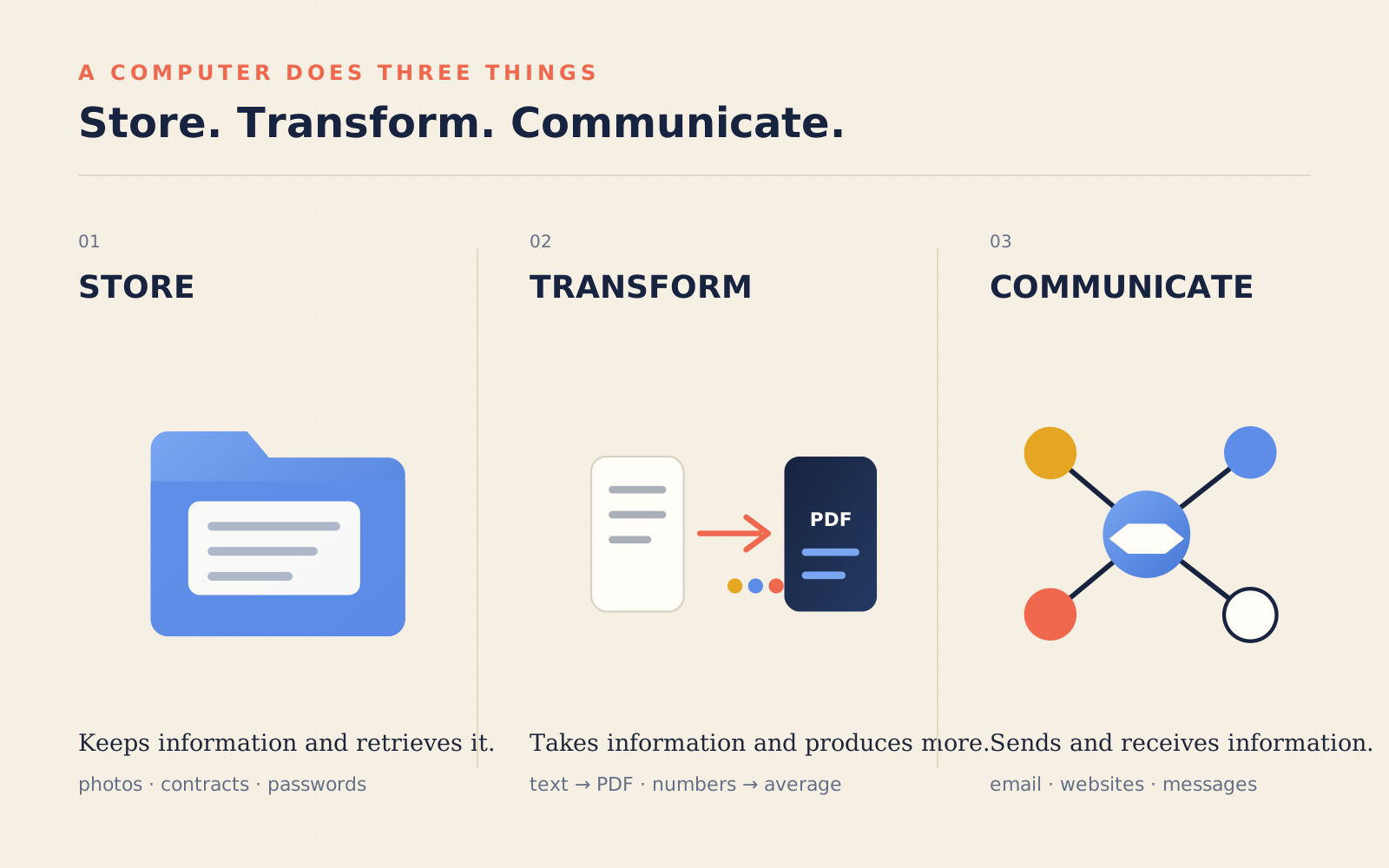
Take away the screen, the keyboard, the apple logo. What is left does exactly three things:
It stores. It sets information aside and remembers it. Your rental contract, the photo of your daughter at the seaside, the list of passwords you know you should not be keeping there, possibly under embarrassing names.
It transforms. It takes information and produces other information. Out of a text it makes a PDF. Out of a thousand numbers it makes an average. Out of a large image it makes a small one.
It communicates. It sends information to other computers and receives it from them. Which is, in the end, the whole of the internet: email, the site you are reading, the message you just sent.
Store, transform, communicate.2 Everything your computer has ever done, and everything any computer has ever done, is a combination of these three verbs. Netflix is “store and communicate”. Photoshop is “transform”. Your company’s management system is all three together, lined up in a particular order.
This is useful for something very practical: working out whether an idea you have in your head can actually be built. Let me give away the answer: almost always, yes.
And there is more. In the physical world ideas run into gravity, materials, the price of steel. In the digital world they do not: you can build a space with laws of your own, where things fall upwards, or where a room is bigger seen from the inside than from the outside. That is not a poetic metaphor, it is a technical property of the medium: every video game is exactly this, a physics invented by someone and made habitable by others. Until now, writing those rules took years of craft. Now you have someone next to you who can write them for you.
The archive
Now you know what a computer does. The next question is: where are the things it does it to?
If you are going to remember one image from this chapter, remember this one: your computer is an enormous archive of folders.3
That is not a teaching metaphor, it is literally how it is organised. Inside there are two kinds of object, and nothing else:
- files, which are the documents: a photo, a song, a text, a program;
- folders, which contain files and other folders.
A folder inside a folder inside a folder. Like Russian dolls, or like a wardrobe with drawers containing boxes containing little bags. There is nothing else. There really is nothing else.
What changes compared with a paper archive is not the structure, it is the substance. In a notary’s filing cabinet there is a sheet of paper: you touch it, and what you see is all there is. In a file, instead, there is a sequence of zeros and ones, which on its own means nothing. It means something only because layers of convention sit on top of it, one resting on the next: these eight zeros and ones are a number, this number is a letter, this row of letters is a word, this text is laid out like so. Stack enough layers and you get to the film you are streaming, which literally is an avalanche of zeros and ones travelling along and, at a certain point, becoming an actor’s face.4
The whole of the digital world is this game of layers, and it is also how you will work: you will say what you want at the highest layer, in your own language, and let the AI go all the way down.
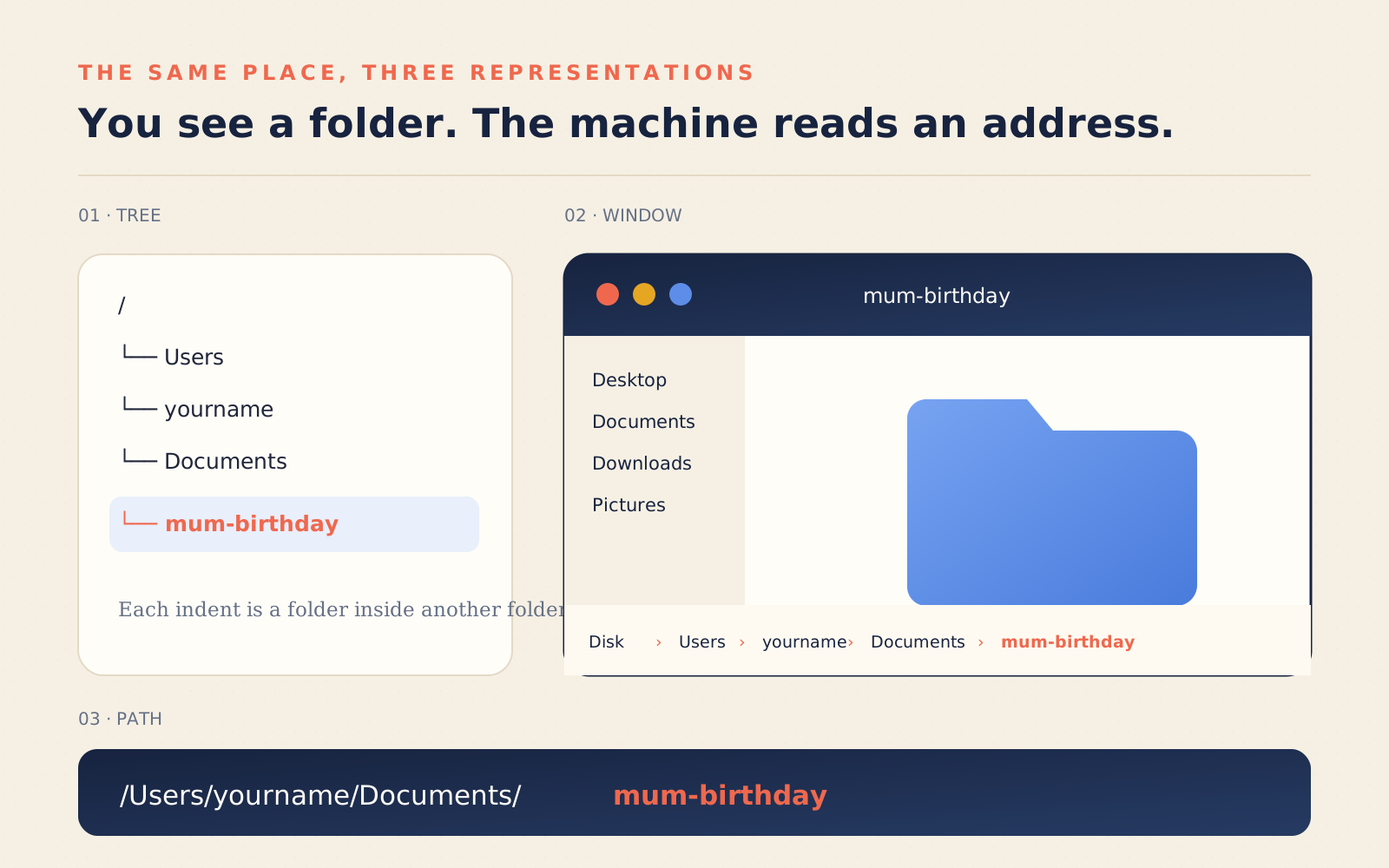
At the very top there is a folder containing all the others. They call it the root, and the structure really is an upside-down tree, trunk at the top and branches going down:
/
└── Users
    └── yourname
        ├── Desktop
        ├── Documents
        │   ├── mum-birthday
        │   └── Invoices
        ├── Downloads
        └── Pictures
Somewhere in that tree there is a branch that belongs to you: your home folder, the one with your name on it, containing Desktop, Documents, Pictures, Downloads. Everything you have done with this computer in the last ten years is in there. Every single thing.
A file’s address
If the computer is a tree-shaped archive, every file has a precise address: the path. You write it by lining up the folders you have to go through, separated by a slash:
/Users/gianclaudio/Documents/Invoices/2026/march.pdfRead it left to right, like directions: start from the root /, go into
Users, then into gianclaudio, then into Documents, then into Invoices,
then into 2026, and in there you find the file march.pdf.
On Windows it works the same way; two cosmetic details change: you start from a
drive letter, and the slashes lean the other way
(C:\Users\gianclaudio\Documents\...). Same idea.5
It sounds like bureaucratic trivia. Instead it is perhaps the single most important notion in this book, and here is why.
When you look for a file with the mouse, you never think about the path: you click, you scroll, you recognise the icon, you open it. The path is implicit, it is “where I am now”. But when you talk to an AI — and even more when the AI works on your computer on its own — the path is the most precise and checkable way of pointing at things. There is no finger to point. There is an address.
“Take all the PDFs in Documents/Invoices/2026, pull out the amounts and give
me a summary.” That sentence works. “Take those invoices there, the ones I
downloaded the other day” does not — or rather, it only works if the two of you
looked for them together first.
And here it is worth defusing an anxiety straight away, because at this point it is natural to think that from now on you will have to memorise rows of slashes. You will not. This works perfectly well too:
“In my Documents there is an Invoices folder, and inside it a 2026 folder: take the PDFs that are in there.”
It is the same address, said in plain words. The slashes are not the point: the point is that you know where the thing is and can say it in a way that leaves one route only. The path written out in full is simply the shortest and most precise version of the same sentence, and when you need it you do not type it by hand: you copy it, as you just did in the exercise, and paste it.
Words stop being enough in one case only, and you may as well know it now: when the description leaves two possibilities open. If you have two folders called “Invoices”, one in Documents and one on the Desktop, “the Invoices folder” no longer points at anything. At that point either the machine guesses, or it stops to ask you which of the two. The second is the right reaction, but neither is what you want in the middle of work.
And it holds the other way round too, as you will discover very soon. It will happen that the AI creates files and you cannot find them anywhere. They have not vanished: they are in a different folder from the one you had in mind. The question to ask — and it will become a reflex — is “which path are you working in?”. It will answer with the exact address, and you will know where to look.
Learning to think in paths is the first small change of perspective. It is not difficult: it is only a habit nobody has ever asked you to pick up. Put less elegantly: you need to know where to send these creatures to work, and every so often check where on earth they are putting their hands. Not because they mean harm, but because they are extremely fast, obedient, and have not the faintest idea which of your folders is the one you care about.
Your files do not belong to programs
There is a very widespread misunderstanding worth clearing up straight away, because it poisons a great deal of reasoning.
Many people think their documents live inside programs. “My letters are inside Word.” “My photos are inside the Photos app.” “My accounts are inside Excel.”
When you are working with an ordinary document, that is not how it is. The document is a file in the archive. The program is a tool that knows how to open it and change it. It is the difference between your notebook and your pen: the pen does not contain the poem, it writes it.
There are applications that keep content in an internal library or in the cloud, and there the boundary is less visible. The useful question stays the same: can I reach that content as a file, or at least export it into a format other tools can read?
Why does it matter? Because a tool can be swapped. If your text is a file, you can open it with Word, with Pages, with a free editor, or have an artificial intelligence read it. Or, if the mood takes you, you can have one written for you, cut to fit the way you write: we will genuinely get there, and it is far less absurd than it sounds right now. If instead your text is locked inside a service that gives you no access to the file, you are that service’s prisoner. And — not a minor detail — so is your AI: it cannot work on something it cannot reach.
From this comes a practical rule that will follow you through the whole book: keep your stuff in files, in folders you can name, on a disk you have access to. It is how you make your digital space habitable by an artificial collaborator.
The ways in
Now for the second half of the question: how can we interact with this machine?
Historically, orders have reached the machine through different doors. The one with the icons you use every day. The terminal, on the other hand, you have probably only heard about.
The door of icons
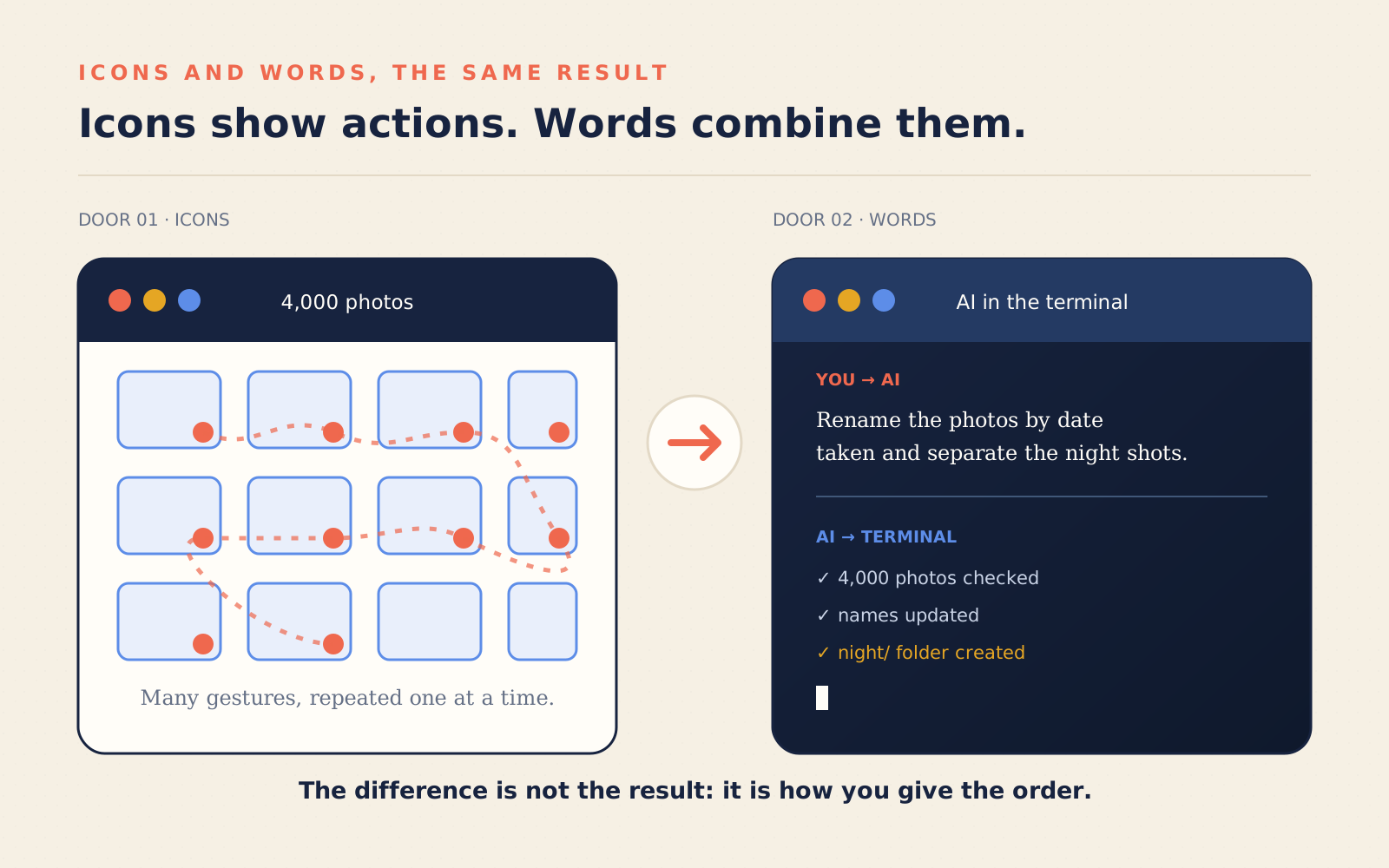
The first is the one you use daily: the graphical interface. A fake desk, with fake folders and a fake bin on it. You point, you click, you drag. It was born in the 1970s in Palo Alto and it was one of the most democratic ideas in the history of technology: it made the computer usable by anyone, with nothing to study.6
It has one enormous virtue: it shows you the possibilities. You open a menu and you see what you can do.
And it has a flaw which is that same virtue seen from behind: you can only do what someone anticipated and designed for you. If the entry you need is not in that menu, the entry does not exist. There is no way of inventing it. You are a guest in someone else’s house, and the house has the rooms it has.
Try thinking about it: “rename these 4,000 photos putting the date they were taken in front, and move the ones taken at night into separate folders.” It is a perfectly sensible request. Which menu do you find it in? None. With icons, that job is four days of clicking.
The door of words
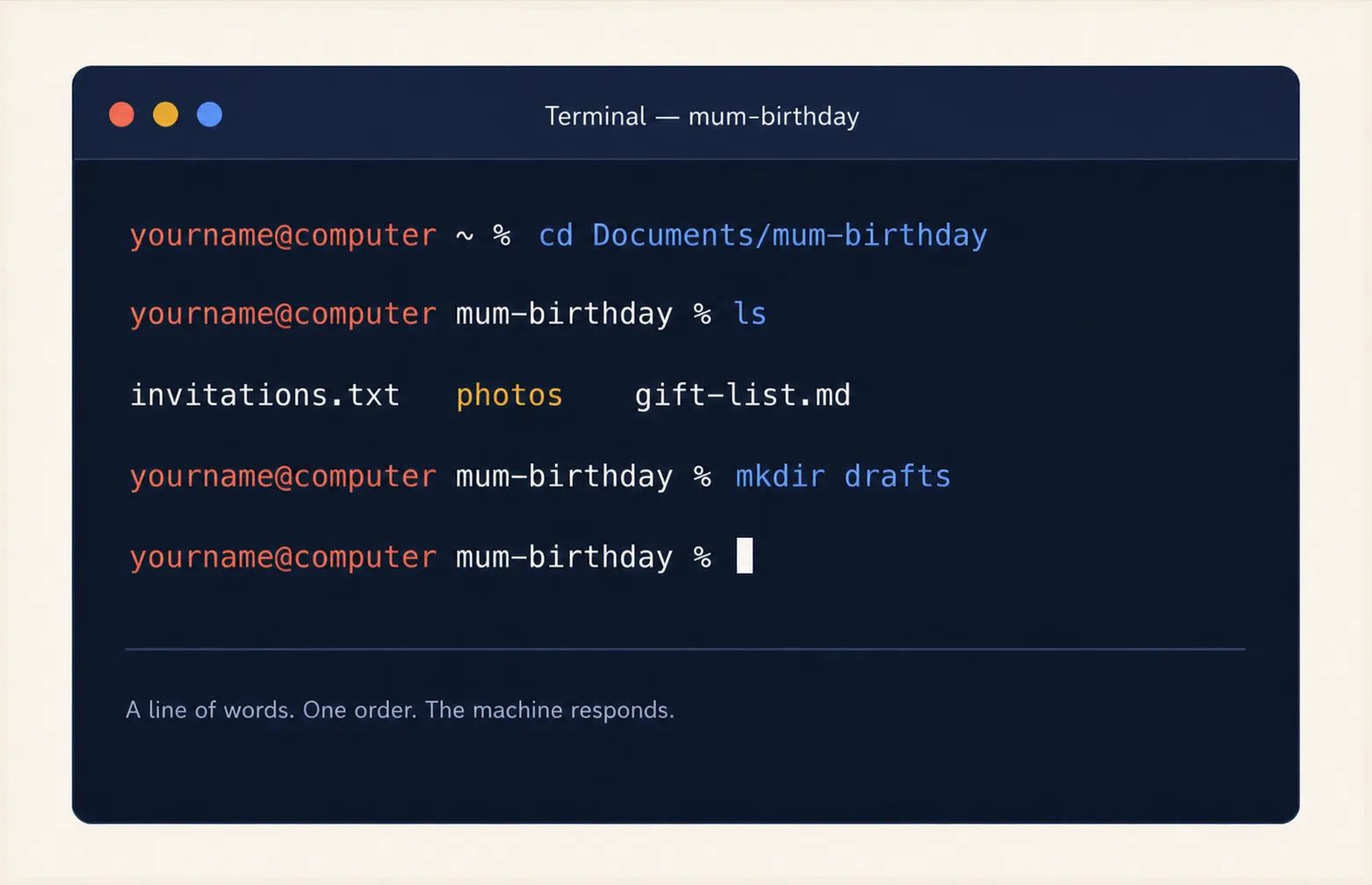
The second door is older and is still there, behind an icon almost nobody opens: the terminal. No buttons, no drawings. A line on which you write an order, press Enter, and the machine carries it out.
It is frightening because it is mute: it suggests nothing, it shows you no options, and if you mistype it answers with an obscure line. It looks like the experts’ place.
But its nature is the opposite of the icons’: it does not limit you to the actions that appear in menus. You can compose orders, chain them, repeat them across thousands of files, save them and reuse them tomorrow. Those 4,000 photos? They can become a single order.
The terminal is the house’s service entrance: ugly, no flowers on the sill, and it opens straight into the kitchen.
And in the kitchen a language is spoken. It is called a shell, and the one you
will find almost everywhere has a name you will hear often: bash (or its
close relative zsh, which is what today’s Macs use).8 It is a small
vocabulary, made of very short words that do elementary things: ls lists
what is in a folder, cd goes into a folder, cp copies, mv moves, rm
deletes, mkdir creates a new folder.
A cook does not know a thousand techniques: they know twenty and combine them. It is the same here. The power is not in the individual commands, which taken alone are utterly banal, but in the fact that they slot into one another: take the list of files, keep only January’s, rename them, move them, all in one go. In the next chapter we will actually cook. For now it is enough to know that a language exists, that it is small, and that your AI speaks it very fluently. Not infallibly: which is why you will learn to make it show what it is doing, and to check the result.
The shortcut that was not there before
Now you can see how it fits together. With icons you give orders by choosing among actions someone already planned. In the terminal orders are written, and they can be combined.
For fifty years the choice was: convenience (icons, limited powers) or power (words, but years of study). Everyone picked their side, and the two worlds looked down on each other.
Then along came an artificial intelligence that already speaks that language. All of it. Better than almost anyone: the “almost” covers a few hundred people in the world, the sort who have written operating systems — like the gentleman who made Linux we were talking about a moment ago.
The AI does not add another door: it places itself in between. You bring everyday language, it translates that into commands and paths, runs them, reads the result and corrects itself when it gets things wrong. You do not have to learn the whole shell to get its power. You have to know what you want, where it should work, and how to check what comes back.
The consequence is vertiginous: the first ceiling on what you can do is no longer your technical skill. It is your willingness to try.
Let us get the proportions right
But now let us take apart, straight away, a promise you will hear a lot of people make, because it is the same sentence that makes this book either credible or useless.
It is not true that you can build yourself an online shop in two minutes. It is not, and whoever tells you so is selling you something. What is true is that the effort no longer grows the way it used to. But it still grows, and it grows with the size of what you want to do:
- a little program for yourself, doing one thing and doing it only on your own machine: an afternoon, genuinely, even without knowing how to program;
- a tool you will use every day and have to trust: a few weeks of adjustments, because the hard part is not making it, it is making it work every time, including when the data arrives crooked;
- a product other people use, with their money and their data inside: months, and real competence, yours or someone’s you pay.
And here is the thing to carry through the whole book: the bigger the project, the more you need to be able to handle the material. Competence has not disappeared, it has changed trade. You no longer need it to type the instructions; you need it to say precisely what you want, to understand what is being proposed, and to notice when an answer is wrong while looking perfect. A brilliant AI, directed by someone who does not know what they are asking for, produces something that does not work — very quickly.
That is why this book does not end at the first successful project. If asking were enough, it would have ended on page twenty.
And the opposite misunderstanding
There is also the mistake with the opposite sign, and it is the one that stops most people. When they hear “you can build whatever you imagine”, their mind jumps straight to the Big Idea, the app that will become a company. And the thought of the Big Idea is paralysing: I do not have one, so I will not even start.
This book is not selling you the next Facebook. It is offering you something much smaller and much more useful: the little program that renames and files your mother’s medical receipts; the spreadsheet that goes and checks your competitors’ prices by itself every Monday; the tool tailored to your work, which nobody will ever put on sale because it would be useful to you and four other people in the world. It is these things that, added up, change your days. The Big Idea, if anything, comes later — and it comes to people who already have their hands in the material.
A safety note: the doorkeeper
The four ideas, the argument and the caution of this chapter are all here. Before closing, though, one reminder is needed: not something to learn now, but a piece we will pick up when it actually matters.
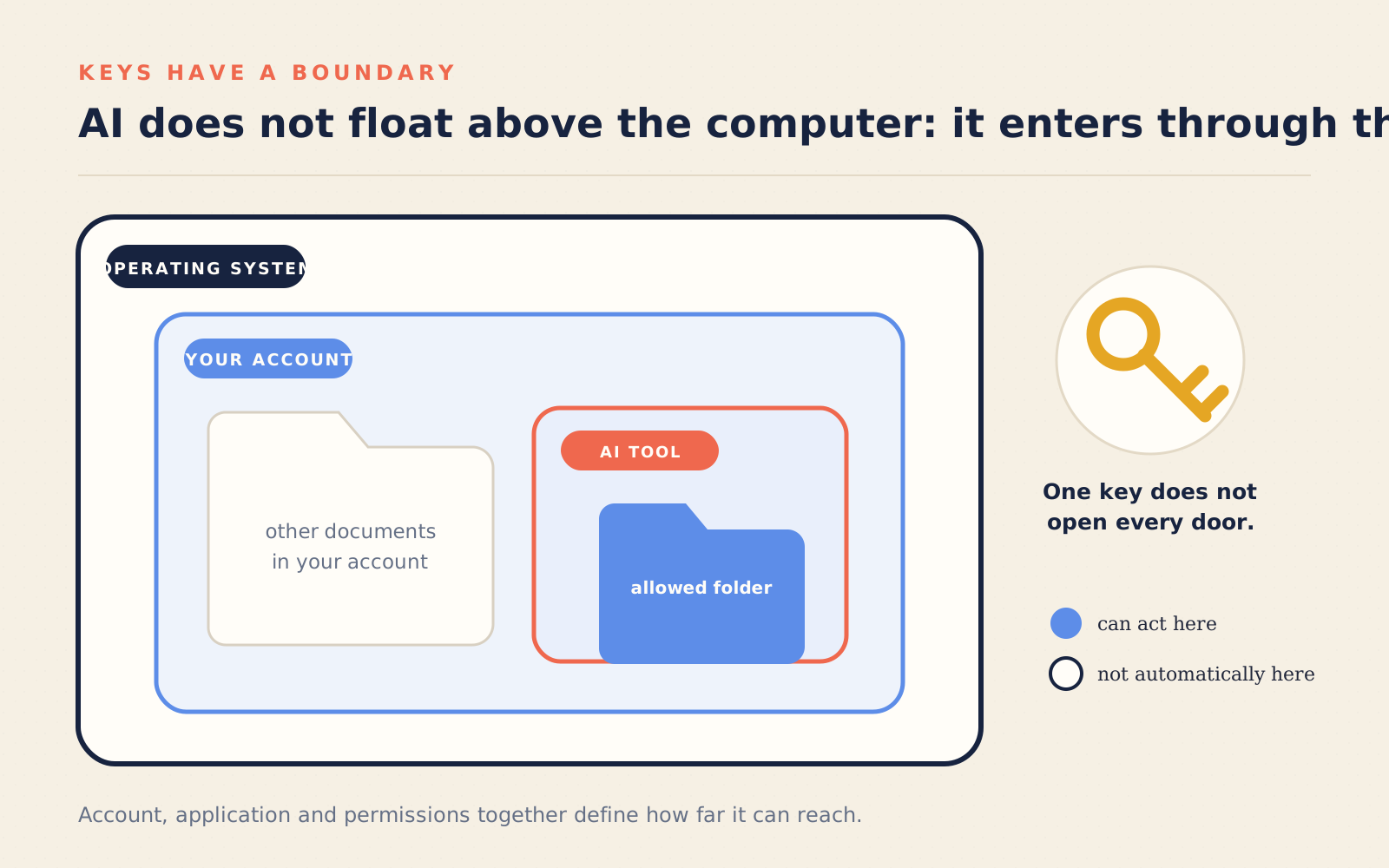
Between you and the machine there is always an intermediary: the operating system. macOS, Windows, Linux. It is the building’s doorkeeper. It keeps the archive in order, decides which program may do what, knows who you are and what you are allowed to touch.
From this come two words you will meet soon and had better not simply put up with:
User. The computer can tell people apart. Each has their own home folder,
their own settings, their own rights. Even if you are the only human being who
touches that keyboard, to the system you are one possible user among others.
That is why your folder sits inside a folder called Users, plural.
Permissions. Some operations are delicate: changing vital parts of the system, installing software for everyone, deleting other people’s stuff. To do them you have to identify yourself, and that is the moment you are asked for a password even though the computer is yours and you are alone in the house. It is not bureaucracy: it protects the vital parts of the system and keeps users apart. But it is not a shield around all your documents: a program you launched can often read, change or delete the files you have access to.9
This concerns you very closely, because when the AI works on your computer it will work as you: with your permissions, inside your perimeter. It is not an entity floating above the machine, it is a tenant using your keys. Knowing how far those keys reach is what will let you give it room without being anxious about it.
The minimum glossary
Five words. From here on I will use them without explaining them again.
File: a document, a unit of information with a name. Folder (cartella in Italian, and directory in the terminal): a container of files and other folders. Path (percorso): the complete address of a file in the tree of folders. Operating system (which you will almost always see shortened to OS): the program that governs the machine and keeps order. Interface (GUI for icons, CLI for words): the way you and the machine talk to each other, in icons or in words.
The Italian in brackets is not there to show off: it is there because the book was written in Italian, and because those are the words you will hear if you work alongside someone who reads it in the original. The English words are the ones you will find in menus, in error messages and on any page you open looking for help.
Where we go now
In the next chapter we open that service entrance, and this time we go in.
Not to become experts — that is not the point, and there is no need anyway. But for a very concrete reason: it is the kitchen the AI works in. If you have never set foot in it, every time you watch it act it will look like incomprehensible magic, and with incomprehensible magic you always end up either trusting too much or not trusting at all.
Half an hour of terminal and the magic becomes a trade you can watch up close. Let us start there.
Notes
What you have read so far is enough to move on: these pages add nothing the next chapter needs, and you can skip them without losing anything.
They are for two opposite kinds of reader. For those who, having reached the end, wondered “but why is it made like this?” — almost every oddity of this machine is a decision someone took, in a particular year, for a reason that was excellent at the time. And for those who have used these things for years without ever seeing where they came from.
The notes follow the order of the chapter. The links almost always lead to the original source.
#1. “Computer” was a job, and people did it
Until the 1940s a computer was a human being: someone, often a woman, paid to carry out calculations by hand, in teams, following a procedure. The machines took the name of the job they replaced.
The line running from the job to the object has three milestones. In 1837 Charles Babbage designs a machine that can do not one calculation but any calculation it is given, and Ada Lovelace writes for that machine — never built — what is considered the first program. In 1936 Alan Turing proves something stronger: there exists a machine capable of imitating any other machine, as long as you describe to it what to do. That is the idea of the general-purpose computer, the reason your laptop is a navigator, a tape recorder and a typewriter without changing any parts. In 1945 the EDVAC report settles the last step: the program does not live in the cabling, it lives in the same memory as the data. From then on, changing what a machine does no longer means rebuilding it, it means writing something inside it. The report carries John von Neumann’s signature, but the attribution has been disputed for eighty years: the work was a group’s, and some of them were already building that machine.
- Treccani, entry «computer» – the history of the word, in Italian.
- Science Museum Group, Babbage’s analytical engine – the real object, photographed.
- Stanford Encyclopedia of Philosophy, «Turing Machines» – what the universal machine is, explained without mathematics for the first third.
- Computer History Museum, ENIAC – the machine you programmed by moving cables.
#2. Why exactly three verbs
Storing, transforming and communicating are not a simplification invented for this book: they are the pieces machines were designed with. The 1945 report describes a memory that holds things, a unit that transforms them, and input and output channels. The third verb, though, meant only cards and tapes back then: communicating in the sense you mean arrives twenty-five years later, when two computers talk to each other for the first time over ARPANET and someone writes the first document in the series that still defines how the internet works — they are called RFCs, and number one is from 1969.
- First Draft of a Report on the EDVAC (1945) – the document in which the machine is broken down into memory, computation and input/output.
- RFC 1 (1969) – the first piece of the internet, written by a student who apologised for the informal tone.
- Computer History Museum, networking timeline – from the first connection to the web.
#3. The tree of folders was not obvious
That files live inside folders inside other folders, endlessly, seems the only possible way of organising an archive. It is not: the first systems had a single flat list, and every file had to have a name different from every other on the machine. The tree structure you use today is fixed in 1965 with Multics, an ambitious and largely failed project, and passes from there to Unix, which simplifies it and makes it the de facto standard of almost everything you switch on today, phone included.
That step also gives us the technical name you will find everywhere in the terminal: not folder but directory, which is the same thing said the way the people who invented it said it.
- Daley and Neumann, A General-Purpose File System for Secondary Storage (1965) – the text that introduces the tree-shaped archive.
- Ritchie and Thompson, The UNIX Time-Sharing System (1974) – eleven pages that decided how almost every computer today is made.
- Filesystem Hierarchy Standard – on Linux, what goes in which folder and why.
#4. Under the file: the layers, one by one
The chapter says a file is a sequence of zeros and ones that means something only thanks to layers of convention. Those layers have names and dates. Eight binary digits make a byte; a table decides that a certain byte is the letter “A” — that table is called ASCII, it dates from 1963, and it contained only English characters. For the rest of the world, accents included, Unicode was needed: it assigns a number to every character of every language, living or dead, emoji included. And since those numbers have to be written to disk somehow, a way of packing them is needed: UTF-8, designed in 1992 by Ken Thompson and Rob Pike of Bell Labs — on a restaurant placemat, according to the people involved — and today the encoding of almost the entire web.
When you open a file and see “perché” instead of “perché”, you are looking at exactly this: a text written with one convention and read with another.
- RFC 20 (1969) – the ASCII table, as it was written at the time.
- Unicode, what it is – the consortium that decides which characters exist.
- RFC 3629 – the definition of UTF-8.
#5. The path, and the story of the backslash
The rule you read left to right — start from the root, go in, go in again — is
written into a real standard, POSIX, which says exactly how a machine must
interpret a file address: what the leading slash means, what happens with .
and .., what counts as a valid name. It is the document that, in the last
instance, the AI obeys too when you hand it a path.
And the Windows backslash? The most widely accepted reconstruction is that it is a historical accident: the first versions of MS-DOS had no folders and were already using the ordinary slash for command options. When folders arrived, the slash was taken, and the job fell to the one leaning the other way. Forty years later we are still carrying it around — although today, in most cases, Windows happily accepts both.
- POSIX, «General Concepts» chapter – the Pathname Resolution section is the official definition of what a path is.
- Microsoft, how paths are written on Windows – including the name restrictions that occasionally block a file.
#6. The fake desk, and who designed it
The chapter says the graphical interface was born in the 1970s in Palo Alto. That is right, but the first scene is from 1968 and takes place a little further along, in Menlo Park: Douglas Engelbart shows an audience of a thousand people the mouse, documents linked to one another, two people writing together on the same text at a distance. In 1973 the Alto is born at Xerox PARC, the first computer designed around a screen with windows and icons. Xerox does not grasp what it has; others do, and in 1984 that fake desk arrives in people’s homes.
It is worth knowing for a reason that is not general culture: the desk, the bin and the folders are a metaphor, that is, somebody’s choice, not the natural shape of the machine. Underneath there is always the tree of directories from this chapter — and that is what the AI sees.
- Doug Engelbart Institute, «The Demo» (1968) – the full video of the demonstration.
- Computer History Museum, Xerox Alto – the machine everything else comes from.
#7. Closed houses and open houses: two movements, not one
The box talks about proprietary and open source software as two families. There are in fact two families inside the second one as well, and the difference is not technical but a matter of intent. In 1985 Richard Stallman founds a movement around free software, defined by four freedoms: to use it, study it, modify it, redistribute it. It is an ethical position: closed code is seen as a wrong done to the user. In 1998 the expression open source appears, with a definition similar in practice but designed to be presentable to companies: here the argument is not freedom, it is that open code turns out better.
In between, in 1991, a Finnish student publishes an operating system written as a hobby, saying it would never become “big and professional”. Today Linux runs almost every server in the world, Android phones and, very probably, the AI service you will be talking to in the coming chapters.
- FSF, the free software definition – the four freedoms.
- Open Source Initiative, the official definition – the ten criteria a licence has to meet.
#8. Why it is called a “terminal”, and what a shell really is
The name is a leftover from when it was an object: a keyboard with a printer or
a screen, at the end of a cable, connected to a big computer that sat in another
room and served many people at once. The window you open today is an imitation
of that object — indeed in system jargon it is still called a tty, which
stands for teletype.
And the shell — the husk: it is the program that sits around the system and translates what you type. The interesting point is that it is a program like any other, and replaceable: from Thompson’s first one in 1971 you go to the Bourne shell in 1979, to bash in 1989 — it stands for Bourne again shell, which reads like born again — through to zsh, which since 2019 has been the default on Macs. When a manual gives you a command that “does not work”, the first suspect is usually this: that manual was talking to a different shell from yours.
- The bash manual – the complete reference, to consult rather than read.
- Zsh – the shell on today’s Macs.
- Apple, use zsh as the default shell – the official note on the 2019 change.
#9. Users and permissions: born to protect you from others, not from yourself
The doorkeeper in this chapter has a precise origin: permissions were born when
one machine served dozens of people at the same time, and something had to stop
one person’s work from deleting another’s. That is why your folder sits inside
Users, plural, even though you are the only user there is.
From this comes the limit the chapter hints at, and which is worth pinning down: that permission system separates users from one another, not your files from the programs you launch. A program you launched is you. That is exactly why modern systems have added a second layer, more recent and closer to our problem: per-application consent — the window asking whether that program may access the Desktop, the Documents, the address book. It is the layer your AI tools will live inside, and it is the reason an access request is worth reading rather than clicking “yes” to.
- POSIX, «General Concepts» chapter – the File Access Permissions section is the classic model: owner, group, everyone else.
- Apple Platform Security – how macOS decides what an application may touch.
- Microsoft, User Account Control – the same idea on Windows.